# Applications and Toolbar Settings

Atollon allows you to set-up what applications users will see in the Application **Launcher** &amp; what favourite applications would appear in the **Toolbar**.

See below how to adjust the visibility of apps &amp; set favourite apps.

#### Run Application Settings

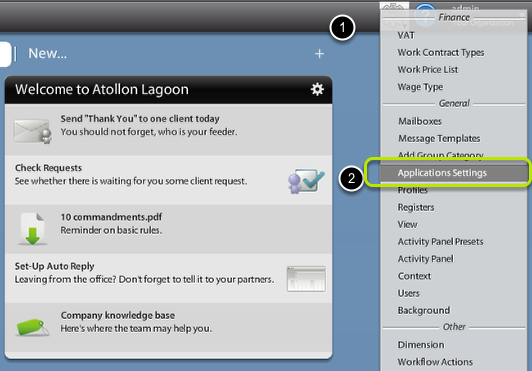
<div id="bkmrk-"><div>[![application-settings-options.png](https://help.atollon.com/uploads/images/gallery/2020-03/scaled-1680-/application-settings-options.png)](https://help.atollon.com/uploads/images/gallery/2020-03/application-settings-options.png)</div><div></div></div>In **Options &amp; Tools** menu, find **Application Settings** under General section.

#### Choose who you are adjusting the settings for

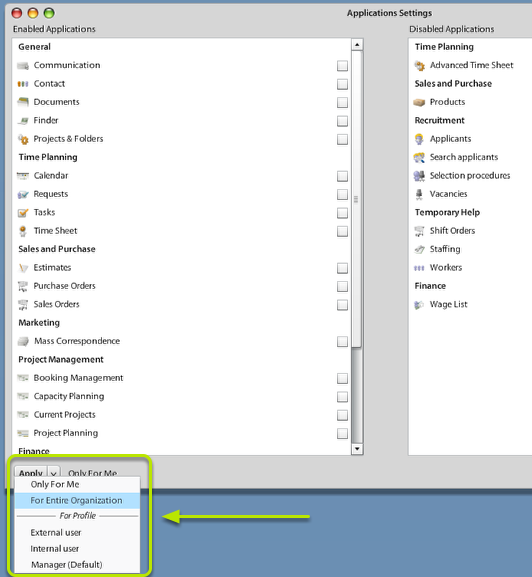
<div id="bkmrk--0"><div>[![application-settings-level.png](https://help.atollon.com/uploads/images/gallery/2020-03/scaled-1680-/application-settings-level.png)](https://help.atollon.com/uploads/images/gallery/2020-03/application-settings-level.png)</div><div></div></div>Using bottom combo field "Apply" you may select what users will be affected by **Application Settings**.

The options are:

<div id="bkmrk-only-for-me---no-oth"><div>- **Only For Me** - no other user than me will be affected
- **For Entire Organization** - all users from the organization will be affected (only once they don't have either personal or profile-based settings)
- **For Profile** (Internal, External, Manager, Consultant, etc.)- users belonging to the selected **User Profile** will use this setting of Applications visibility &amp; Toolbar icons (only once they don't have their own personal settings)

</div></div>#### Select Applications visible in Application Launcher

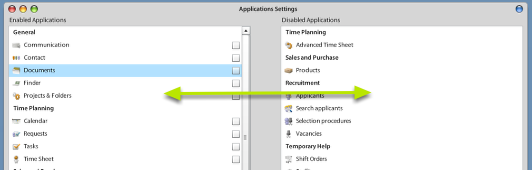
<div id="bkmrk--1"><div>[![application-settings-configure.png](https://help.atollon.com/uploads/images/gallery/2020-03/scaled-1680-/application-settings-configure.png)](https://help.atollon.com/uploads/images/gallery/2020-03/application-settings-configure.png)</div><div></div></div>Simply by **Drag &amp; Drop** select applications that will become **disabled** and what applications will stay **enabled**.

#### Select favourite Applications to place on Toolbar

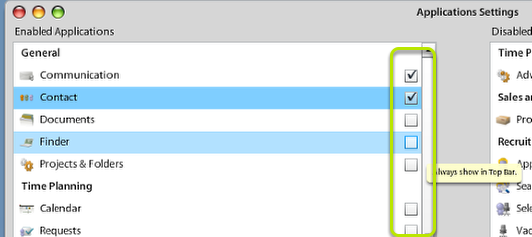
<div id="bkmrk--2"><div>[![application-settings-toolbar.png](https://help.atollon.com/uploads/images/gallery/2020-03/scaled-1680-/application-settings-toolbar.png)](https://help.atollon.com/uploads/images/gallery/2020-03/application-settings-toolbar.png)</div><div></div></div>Check which applications should be always displayed in application **Toolbar** ...