# Set-up auto-response

Do you want to send your partners information that you are not available now?

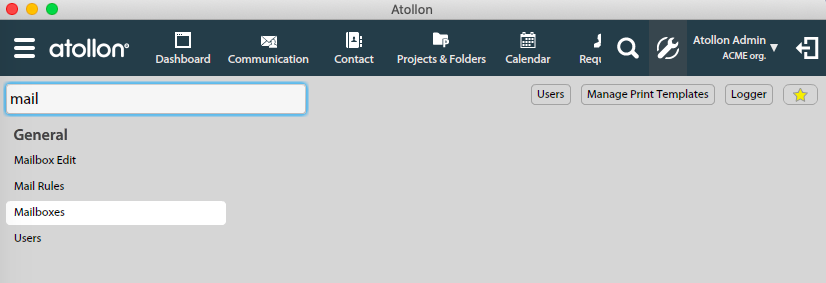
#### Go to Options &amp; Tools &gt; Mailboxes

<div id="bkmrk-">[![mailbox-edit.png](https://help.atollon.com/uploads/images/gallery/2020-03/scaled-1680-/mailbox-edit.png)](https://help.atollon.com/uploads/images/gallery/2020-03/mailbox-edit.png)</div>#### Allow Auto-response

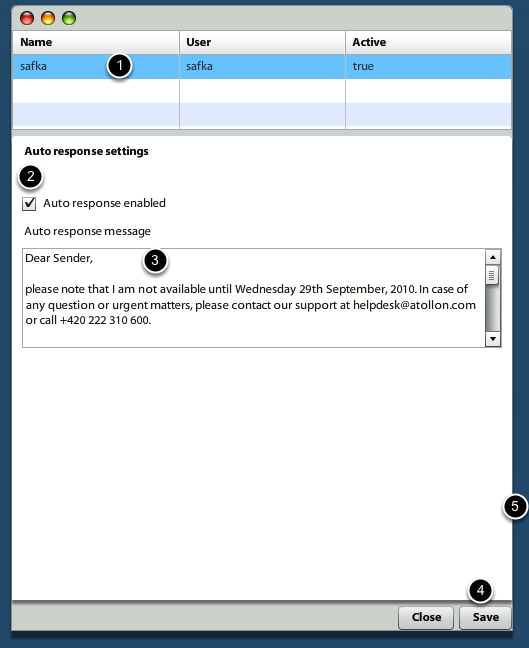
<div id="bkmrk--0"><div>[![mailbox-edit-autoresponse.png](https://help.atollon.com/uploads/images/gallery/2020-03/scaled-1680-/mailbox-edit-autoresponse.png)](https://help.atollon.com/uploads/images/gallery/2020-03/mailbox-edit-autoresponse.png)</div></div>First select **mailbox** (yes, you can have more mailboxes), then allow **Auto response** and write your message. In the end, do not forget to **Save**.  
Now once someone sends you e-mail (message), he/she gets the notification automatically.