# Projects

### New Project

This lesson shows how to create new project for your client in simple **Client** &gt; **Project** Finder structure.

#### Open Finder to locate your client

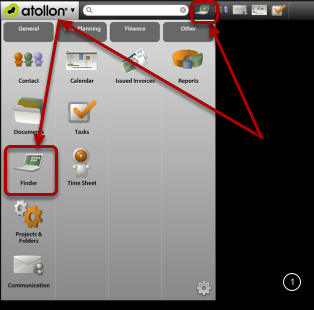
<div id="bkmrk-"><div>[![project-new-1.png](https://help.atollon.com/uploads/images/gallery/2020-03/scaled-1680-/project-new-1.png)](https://help.atollon.com/uploads/images/gallery/2020-03/project-new-1.png)</div><div></div></div>You can open Finder either clicking **Finder** icon in **Atollon Toolbar** or using **Application Launcher**.

#### Look-up for your client

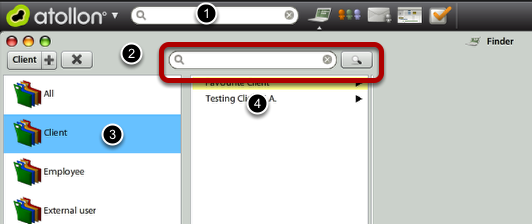
<div id="bkmrk--0"><div>[![project-new-2.png](https://help.atollon.com/uploads/images/gallery/2020-03/scaled-1680-/project-new-2.png)](https://help.atollon.com/uploads/images/gallery/2020-03/project-new-2.png)</div><div></div></div>There are multiple ways of opening your client's folder in Atollon.

1.) You can directly **search** for it's name in Atollon's search bar  
2.) You can search for it's name after opening Finder  
3.) You can click on Clients in Finder and then 4.) browse for the client

After you have found your client, you should select it in Finder. (Alternatively, you can open Client's details by double-clicking on the record).

#### Create new project from Finder

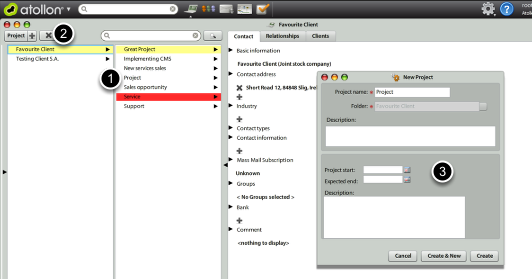
<div id="bkmrk--1"><div>[![project-new-3.png](https://help.atollon.com/uploads/images/gallery/2020-03/scaled-1680-/project-new-3.png)](https://help.atollon.com/uploads/images/gallery/2020-03/project-new-3.png)</div><div></div></div>After you selected your client in Finder, you can select which Type of Project (based on **Project Template**) you would like to create. Select the project in top-left corner of the Finder and New Project window appears.

#### Create new project from Client detail

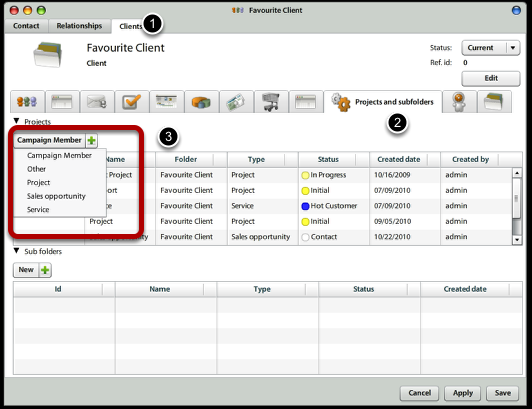
<div id="bkmrk--2"><div>[![project-new-4.png](https://help.atollon.com/uploads/images/gallery/2020-03/scaled-1680-/project-new-4.png)](https://help.atollon.com/uploads/images/gallery/2020-03/project-new-4.png)</div><div></div></div>If you opened Client detail (from Finder, Contacts, Report results, etc.), you can create new project from **Projects and subfolders** tab. Just select the Project Template in top left corner of projects overview.

#### Adjust project after it was created

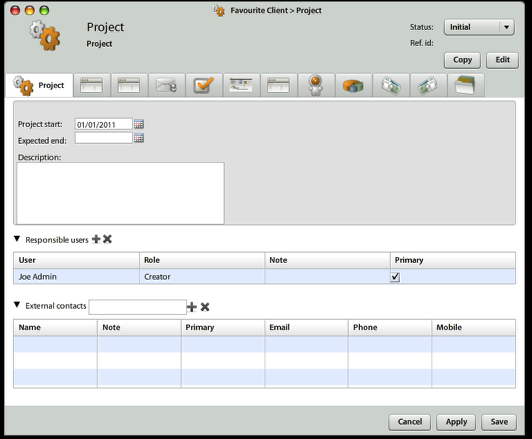
<div id="bkmrk--3"><div>[![project-new-5.png](https://help.atollon.com/uploads/images/gallery/2020-03/scaled-1680-/project-new-5.png)](https://help.atollon.com/uploads/images/gallery/2020-03/project-new-5.png)</div><div></div></div>After creating a project, you would probably want to assign **Responsible users** (when assigned to project role, this would give them access rights to the project). In case you want to time by time inform your external contacts on project by mass mail, you should attach the external contact to project as well.  
New Project (Job) Number is assigned to project automatically, once it is set-up in Numbering Administration.